
What the Calendar Contract technique is
The “Calendar Contract” technique is a simple way to turn vague requests like “can you take a look?” or “let’s sync sometime” into a specific, time-blocked commitment—without scheduling another meeting just to define the work. The idea is to treat time on the calendar as the shared agreement: what will happen, when it will happen, and what “done” means.
Unlike a traditional back-and-forth thread, a Calendar Contract creates a lightweight decision point. Either you both accept a defined slot and scope, or you both learn quickly that the request isn’t ready. In practice, this reduces hidden work, prevents “drive-by” asks from consuming whole afternoons, and gives the requester a clearer outcome than “sure, I’ll try.”
Why ambiguous requests keep creating extra meetings
Most extra meetings aren’t caused by complex problems—they’re caused by unclear inputs. Common patterns include:
- Undefined scope: “Review this” could mean a typo check or a strategic rewrite.
- Undefined urgency: “ASAP” can mean “today” or “this quarter.”
- Undefined artifact: The requester doesn’t specify what they’ll send (link, doc, screenshots, data).
- Undefined decision: No one states what decision will be made after the work happens.
When any of these are missing, people compensate with meetings. The Calendar Contract replaces the compensating meeting with a structured time block that forces clarity.
The Calendar Contract in one sentence
Convert a request into a calendar block that includes a deliverable, inputs, and a deadline—then accept, revise, or decline the block.
How to create a Calendar Contract without adding meetings
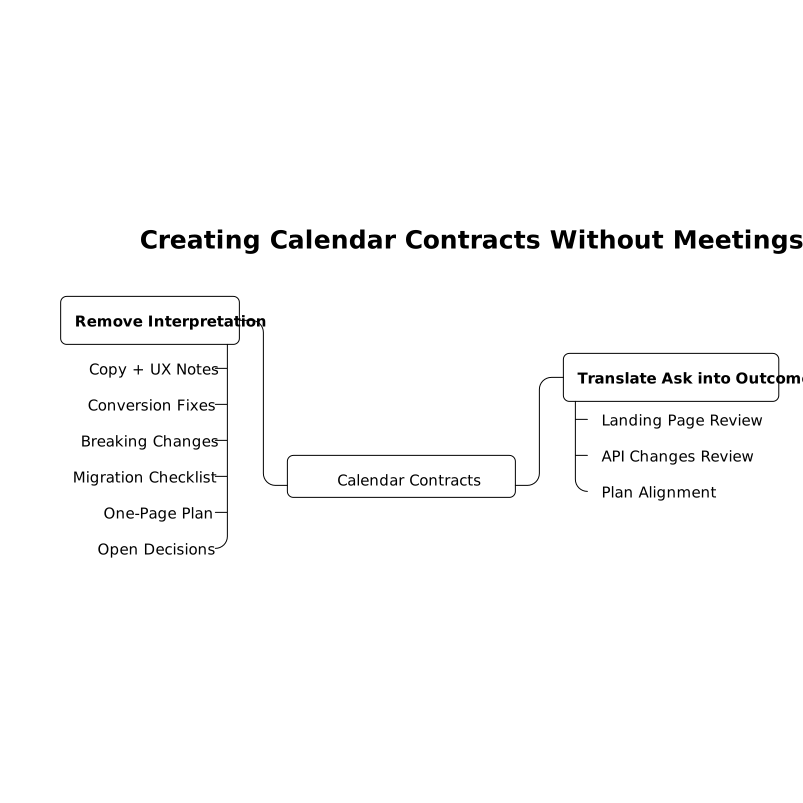
1) Translate the ask into a concrete outcome
Before you propose a time block, rewrite the request as an outcome. This is not about over-formalizing; it’s about removing interpretation.
- “Can you take a look at this landing page?” → “Provide copy + UX notes and a prioritized list of conversion fixes.”
- “Can you review the API changes?” → “Identify breaking changes and propose a migration checklist.”
- “We should align on the plan” → “Write a one-page plan and list the open decisions.”
If you work in web analytics or growth, this mindset mirrors the discipline used in technical hygiene work: when the outcome isn’t defined, attribution and ownership drift. (A similar dynamic appears in conversion tracking when URLs and canonicals don’t line up; see landing page canonicalization fixes for an example of how small ambiguities become costly.)
2) Choose the smallest valid time block
The Calendar Contract works best when the default block is small enough to be easy to accept, but large enough to produce a useful artifact. Typical sizes:
- 15 minutes: triage, decision framing, quick review, or outlining next steps
- 30 minutes: substantive review with notes, light edits, or a short analysis
- 45–60 minutes: deeper analysis or producing a first draft with recommendations
Smaller blocks also make it easier to say “yes” without sacrificing your day. If the work expands, it expands with explicit renegotiation rather than silent scope creep.
3) Specify inputs and the handoff point
Every Calendar Contract should include what you need to start and what you will hand back. A practical template:
- Inputs needed: link/doc, context, success criteria, and deadline
- Work performed: what you’ll do during the block
- Output: what they’ll receive (commented doc, checklist, annotated screenshot, short memo)
- Next action: who decides and what happens after the output
This turns the calendar from “time reserved” into “time reserved for a defined exchange.”
4) Send a calendar invite instead of another thread
The most effective move is to propose the block as a calendar entry with a descriptive title and a short description. The invite itself becomes the contract. If the requester accepts, you have permission to spend that time. If they decline, you have a signal that the request needs refinement.
In Routine, this pattern is especially natural because tasks, notes, and calendar live together. You can capture the request as a task, add the needed inputs in the note, then time-block it. The contract stays attached to the work rather than scattered across tools.
5) Use three responses only: accept, revise, or decline
To avoid endless negotiation, limit yourself to three actions:
- Accept: the block and scope are correct.
- Revise: propose a different duration, a different deliverable, or required inputs.
- Decline: you can’t take it on, or it’s not ready. Offer a minimal alternative if helpful.
This keeps the technique from becoming a bureaucracy. The goal is speed and clarity, not process.
Examples you can copy and paste
Example 1: “Can you review this?”
- Invite title: Review: landing page draft (prioritized fixes)
- Duration: 30 minutes
- Description: I’ll review the page and return a prioritized list of copy + UX changes. Please attach the link and your target audience + goal for the page.
- Output: checklist + top 3 recommended edits
Example 2: “Let’s align” (without a meeting)
- Invite title: Write: alignment note + open decisions
- Duration: 45 minutes
- Description: I’ll draft a one-page plan and list the open decisions. Please send the latest context and what decision you need by when.
- Output: shared note to review asynchronously
Example 3: “Can you investigate?”
- Invite title: Investigate: issue reproduction + next steps
- Duration: 60 minutes
- Description: I’ll attempt to reproduce, identify likely cause areas, and propose next steps. Please include steps to reproduce, environment details, and any logs.
- Output: short investigation memo + recommended owner
Where Calendar Contracts fail and how to fix them
The block is accepted but the inputs never arrive
Fix: include a simple condition in the invite: “If the link isn’t attached by X, I’ll release the block.” This keeps your schedule honest and trains the organization to respect inputs.
The request keeps expanding mid-block
Fix: treat expansion as a new contract. Write a one-line note: “Out of scope for this block; I can schedule a second block for X minutes to cover it.” This is how you protect deep work without sounding defensive.
You’re the bottleneck for decisions
Fix: make the output decision-ready. Instead of “thoughts,” provide options with tradeoffs and a recommended choice. This reduces the chance that your output triggers yet another meeting.
How to adopt the technique on a team
- Standardize invite titles: start with a verb (Review, Draft, Investigate, Triage).
- Keep a shared template: outcomes, inputs, output, next action.
- Prefer async artifacts: replace “sync” with a written note when possible.
- Make time-blocking visible: when people see reserved blocks, they learn how work actually happens.
Teams that already run on lightweight written artifacts typically find Calendar Contracts easy to adopt. For organizations working with automations and workflows, the same philosophy applies: define the step, define the input, define the output, and only then run it—otherwise you get “stuck steps” in human form (the pattern is similar to diagnosing stuck DAG steps in internal automations).
Vertical Video