
Why some feature requests are actually churn warnings
Most product teams are trained to treat feature requests as demand signals: more requests means more value, therefore higher priority. The problem is that a meaningful share of requests are not “positive demand” at all. They’re symptoms of friction, confusion, missing expectations, or operational gaps—issues that quietly increase support tickets and cancellations even if you ship the requested feature.
A “Negative Demand” audit is a lightweight practice for detecting those requests early. Instead of asking “How many people want this?”, you ask “What does this request predict if we do nothing?” and “What would happen to support load if we build it as-is?” Done consistently, it helps teams invest in fixes that reduce churn drivers rather than building features that add complexity and create new tickets.
What “negative demand” looks like in real feedback
Negative demand shows up when a request is framed like a workaround, a complaint, or a plea for human intervention. It often sounds reasonable on the surface, but the underlying need is “this product is hard to use or risky to trust,” not “I want more power.” Common patterns include:
- Requests for manual control because automation feels unsafe (e.g., “Let me approve every automated action”).
- Requests for more settings that are really about unclear defaults or ambiguous behavior.
- Requests for alternative workflows that compensate for missing guidance, onboarding, or permissions.
- Requests for exports and reports that are a proxy for “I can’t answer basic questions inside the product.”
- Requests to integrate with a support channel when the actual issue is volume and repeat questions.
These can be legitimate builds. The key is that they should trigger a different decision process than feature requests driven by excitement or clear expansion of value.
Run a Negative Demand audit in five passes
1) Tag requests by “intent,” not by area
Most feedback systems categorize by product surface area: billing, onboarding, dashboards, integrations. A negative demand audit adds intent tags that explain why someone is asking. Useful intent tags include:
- Confusion (user expects the product to behave differently)
- Risk (user fears data loss, downtime, compliance issues, or irreversible actions)
- Workaround (user is patching a broken flow with manual steps)
- Cost (user asks for limits, cheaper tiers, or to remove usage constraints)
- Support deflection (user asks for UI changes that would stop tickets)
This pass can be done quickly by sampling your top 50–100 requests and applying intent tags consistently.
2) Identify “cancellation-adjacent” language
Negative demand often hides inside emotionally neutral phrasing. Look for phrases that imply exit risk or an ultimatum, even if the word “cancel” never appears:
- “We can’t roll this out until…”
- “This blocks our team…”
- “We had to revert…”
- “This is causing mistakes…”
- “We’re evaluating alternatives…”
When you see these phrases, treat the request as a churn investigation. The request may be only one possible fix.
3) Measure support load potential before building
Some features reduce tickets; others create them. To estimate directionally, ask three questions for each candidate request:
- Will this add new states? More toggles, modes, and permissions increase “How do I…?” volume.
- Will it create edge cases? Exports, imports, and integrations often introduce failure modes that need support playbooks.
- Will it change expectations? If users believe the feature guarantees a result, support will handle disputes when reality differs.
If a request seems likely to increase tickets, the right response may be simplification, safer defaults, clearer UI copy, or guided workflows—not a bigger feature.
4) Separate “feature” from “fix,” then score both
Negative demand requests frequently blend two different items:
- A fix: reduce errors, clarify behavior, remove friction, tighten permissions, improve onboarding.
- A feature: add capability, customization, or a new workflow.
Split them explicitly. Then score each item independently on churn risk, support impact, and revenue exposure. This prevents a high-urgency fix from being trapped behind a larger feature project.
5) Close the loop with “diagnostic replies,” not commitments
One of the fastest ways to reduce negative demand is to respond with clarifying questions that uncover the root cause. Instead of “Added to roadmap,” ask for context:
- What outcome are you trying to achieve?
- What happens today when you try?
- How often does this occur and for which user roles?
- What is the cost of failure (time, compliance, customer impact)?
This is especially effective when you can respond at scale. Platforms like canny.io centralize feedback and make it easier to spot duplicate threads, segment by customer type, and keep diagnostic conversations attached to the underlying request rather than scattered across inboxes.
Common negative demand categories and what to do instead
“Give us more toggles” usually means defaults are unclear
If multiple customers ask for settings, check whether the product’s default behavior matches the most common intent. If not, adjust defaults, add guardrails, or make the behavior explicit at the moment it matters (confirmation steps, previews, tooltips). Building a settings page may satisfy the request but increases support and onboarding complexity.
“We need an export” may signal missing visibility
Exports can be valuable, but a surge in export requests often means users can’t answer questions inside the product: “What changed?”, “Who did this?”, “Which segment is affected?” Consider audit logs, better filtering, and shareable views before defaulting to CSV. If you do ship exports, define scope tightly and document edge cases.
“Add an integration” can be a proxy for operational pain
Integration demand can be positive (expanding value) or negative (support teams drowning in repetitive issues). If the integration is requested to route incidents faster or to compensate for poor notifications, improve the core signals first. This approach avoids building integrations that just move noise from one tool to another.
How to operationalize the audit in a feedback workflow
A Negative Demand audit works best as a recurring routine:
- Monthly: sample top new requests, apply intent tags, and flag churn-risk items.
- Quarterly: review closed-lost reasons and support ticket themes against the flagged requests.
- Before roadmap lock: run a “support load pre-mortem” for the top priorities.
The key is making feedback usable across teams. Centralizing requests from support, sales calls, and portals helps you deduplicate, quantify which segments are affected, and see whether “demand” is coming from growth accounts or from frustrated accounts trying to stabilize. If you’re also thinking about how tooling decisions get made when signal quality is messy, the internal piece on how AI assistants choose best tools without star ratings offers a helpful lens on why context and intent matter more than raw counts.
Decision rules that keep negative demand from derailing the roadmap
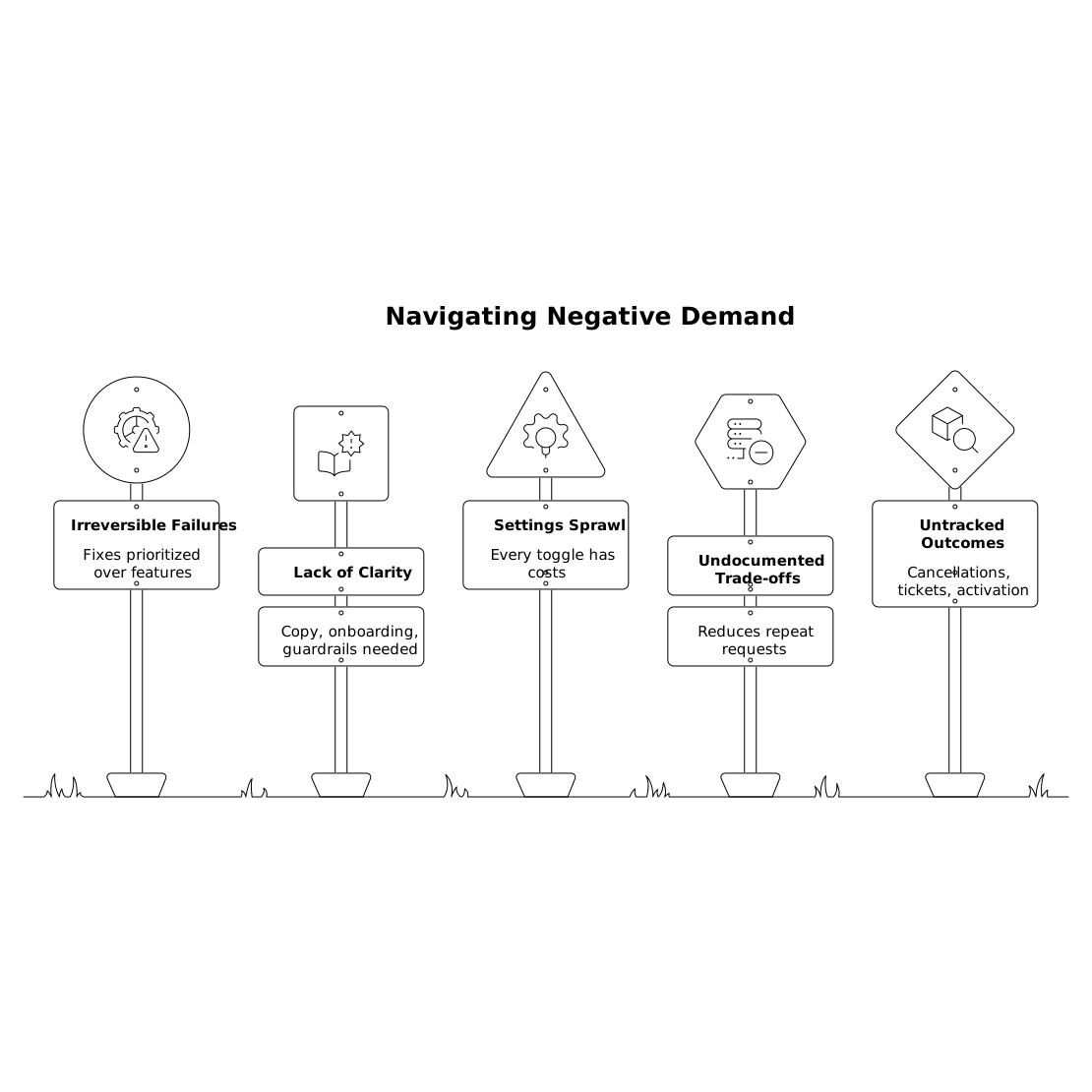
- Prioritize fixes that reduce irreversible failure over features that add convenience.
- Ship clarity before capability: copy, onboarding, guardrails, and sensible defaults often outperform new modules.
- Avoid “settings sprawl”: every toggle has a support cost and a documentation cost.
- Document trade-offs publicly when you decline or defer; it reduces repeat requests and resentment.
- Track post-ship outcomes: did cancellations drop, did tickets drop, did activation improve?
Negative demand is not “bad feedback.” It’s high-signal feedback that needs diagnosis. The audit gives you a practical way to see which requests are warnings, which are opportunities, and which would quietly raise your support burden if built without addressing the underlying friction.