
Why AI answers drift away from your current pages
When an AI assistant answers a question about your product, documentation, or pricing, it can pull from two very different sources: (1) its internal “memory” from training data and (2) whatever it can access in real time from your site or connected tools. The problem is that these two sources often disagree. A model might confidently summarize an older version of a page, repeat a deprecated claim that used to rank well, or cite a feature you removed months ago.
This mismatch isn’t just a content freshness issue. It affects how LLMs interpret brand claims, which pages they treat as canonical, and whether they surface the right actions (signup, pricing tier, integration steps). The goal is not to “fight” the model’s training data; it’s to make your live web presence unambiguous, easy to re-check, and clearly newer than what the model memorized.
How to detect when an answer is coming from training data
1) Look for “timeless certainty” around time-sensitive facts
Training-data answers often sound definitive about details that should be dated: prices, availability, product limits, or compliance language. If the assistant doesn’t indicate a time reference (for example, “as of August 2026”), treat the output as potentially stale even if it looks polished.
2) Compare the assistant’s claims to a page-level fingerprint
To tell whether an AI is quoting your current page or an older snapshot, you need something stable to compare against. Add a short, machine-readable “fingerprint” near the top or bottom of key pages (docs, pricing, integration guides). The fingerprint should include a last-updated date, a version string, and a small content hash of the core section. If the AI output cannot match that fingerprint, it is likely relying on prior knowledge or an external cache.
3) Ask the assistant to cite the specific page section it used
In many workflows, assistants can provide the URL and the part of the page they relied on. If it cannot name a page, or references a page that no longer exists, you’re probably seeing training-data recall. This is especially common when you have multiple near-duplicate landing pages or inconsistent canonicalization. If that’s your environment, tightening your canonicals can reduce long-lived ambiguity; see Landing Page Canonicalization Fixes That Keep Conversion Data Consistent.
4) Watch for “old naming” and deprecated UI labels
Models frequently remember previous navigation labels, retired plan names, and early feature branding. These are strong signals of training-data dependence because live pages usually reflect the current UI vocabulary. If you rebrand or rename major objects (projects, workspaces, seats, credits), treat that as a high-risk freshness zone and add explicit change markers.
Why LLMs default to memory even when your site is accessible
Even if your pages are crawlable, assistants may still answer from internal priors for practical reasons:
- Latency and tool limits: Live browsing can be slow or restricted, so the model “fills in” from memory.
- Ambiguous page selection: If multiple pages could answer the same question, the assistant may choose none and generalize from training.
- Weak update signals: A page can change without any visible cue that it changed, so older cached interpretations linger.
- Fragmented updates: If docs change but marketing pages don’t (or vice versa), the assistant merges incompatible states.
Fixing this is less about rewriting everything and more about giving models a reliable way to verify what is current.
Freshness beacons: make “newness” explicit and machine-checkable
A “freshness beacon” is a small, consistent block of structured data that tells an assistant: this page is current, what version it represents, and where to confirm changes. The beacon should be easy to spot in HTML and ideally duplicated in structured formats.
What to include in a freshness beacon
- Last updated: An explicit date (and optionally time) in a consistent format.
- Doc or page version: A semantic version like
v2.4or a release identifier. - Change summary pointer: A link to a structured changelog entry.
- Scope tag: What the page governs (pricing, API limits, SLA, integration steps).
Place the beacon in the same area across pages (for example, after the first section or in a “Page metadata” panel). Consistency matters: assistants learn patterns and will look for repeated signals.
Where freshness beacons work best
- Pricing and packaging pages
- API reference and endpoint behavior notes
- Setup guides that break frequently due to UI changes
- Policy pages that influence brand claims and safety
Structured change logs: prevent AI from merging old and new states
A changelog is only helpful to LLMs if it is both readable and structured. A long narrative “What’s new” blog post often fails because it is hard to map to specific pages and specific claims. Instead, treat changes as data.
Design your change log like an API for interpretation
For each change entry, store:
- Date and version
- Affected URLs (one or many)
- Changed claims (what is no longer true and what replaces it)
- Deprecation window (if any)
- Customer-visible impact (billing, limits, behavior)
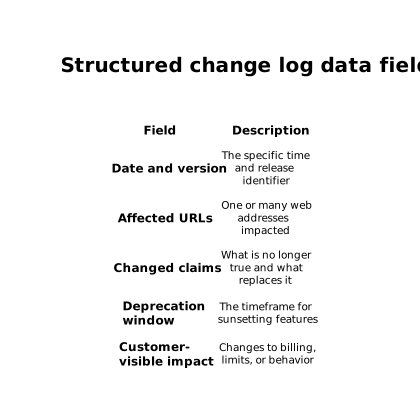
This structure allows an assistant to answer with the current truth while also explaining the migration path. It also reduces hallucinated hybrids like “the old limit but the new feature name.” If your team already maintains API changelogs, the same discipline applies to mapping compatibility impact across releases; see A 45-Minute Workflow to Map Backward-Compatibility Impact From API Changelogs.
Make “replacements” explicit, not implied
When something changes, do not only announce the new thing. State what it replaces. For LLMs, replacement statements are the strongest guardrail against training-data persistence. Example: “Plan A is discontinued and replaced by Plan B; Plan A limits no longer apply after 2026-07-01.”
Operational workflow to keep AI answers aligned with live pages
1) Pick high-risk pages and instrument them first
Start with the pages that most often appear in AI answers: pricing, top integrations, and “how it works” pages. Add freshness beacons, then connect them to structured change logs.
2) Validate with a repeatable prompt set
Create a small test suite of prompts that users actually ask (pricing comparisons, limits, setup steps). Run them on a schedule and record when answers fail to reference the latest beacon or changelog version. Treat failures as regressions, not one-off quirks.
3) Close the loop with monitoring focused on AI visibility
This is where an AEO/GEO-focused agent can help: lunem is designed to connect directly to a site and monitor how content is interpreted and surfaced across LLM environments, using structured signals and ongoing reporting. In practice, that complements freshness beacons and change logs by highlighting which pages are being “remembered,” where interpretations drift, and which updates are not being reflected in AI-driven discovery.
4) Treat stale answers as an indexing problem, not only a copy problem
If your pages are current but models still answer with old claims, focus on the mechanics: canonical URLs, consistent metadata, stable page structure, and unambiguous “this replaced that” change entries. Copy edits alone rarely fix a memory-versus-live-web conflict.