
Separate AI crawler hits from human visits using request-level signals
If you avoid cookies and persistent IDs, you can still measure LLM crawler and AI indexing traffic separately from human visits. The key is to rely on signals that are already present in a single HTTP request (headers, method, path, and response codes) and to treat “AI traffic” as a set of machine classes rather than one monolith. That keeps measurement privacy-preserving and makes the results actionable for SEO, infrastructure, and content decisions.
Define the two machine buckets you actually care about
Teams often lump everything “non-human” together, but for AI-related traffic you typically want two separate buckets:
- LLM crawlers: automated fetchers used to collect training or retrieval corpora. These are usually high-volume, less tied to your search performance, and can show up as bursts against many URLs.
- AI indexing and assistant fetches: requests that support AI answers or tool results. These are more likely to correlate with content that gets cited, summarized, or pulled into a “best answer” flow.
You can measure both without cookies by classifying requests at the edge (CDN / reverse proxy) or at the origin (web server logs) and then forwarding aggregate counts to analytics.
Use first-party, no-identifier analytics for human baselines
Before segmenting bots, make sure your human baseline is clean. A privacy-first setup that doesn’t use cookies or fingerprinting is helpful because it forces you to rely on aggregate measurement instead of user-level stitching. Plausible Analytics is built for this: it reports core traffic and conversion metrics without cookies or persistent identifiers, and it includes bot filtering so your main dashboard stays focused on human visits. For a reference implementation, see plausible.io.
Practically, you’ll end up with two parallel data streams:
- Human analytics (pageviews, sources, goals) from your site event script (no cookies).
- Machine request analytics from logs/edge counters (no user identity needed).
Classify traffic without cookies or IP fingerprinting
1) Start with declared identity signals (User-Agent and related headers)
The most common and privacy-safe classifier is the User-Agent. Many major crawlers identify themselves clearly. Build a rule set that maps known patterns to categories like “LLM crawler,” “AI indexer/assistant,” “search crawler,” and “generic bot.”
To avoid brittle logic, treat this as a continuously maintained allowlist/typology rather than a one-time regex. Your outcome should be a simple label per request, not a guess at a user.
2) Add behavioral request features that don’t identify people
Even without IP-based heuristics, machine traffic tends to expose itself through request properties that are not personal data:
- Method and path patterns: bots often hit sitemaps, robots.txt, feeds, parameterized URLs, or large URL sweeps.
- Accept headers: some fetchers prefer specific content types or omit typical browser combinations.
- HTTP protocol and fetch mode: modern browsers often send fetch-related headers that bots may not.
- Status code distribution: crawlers generate more 404/410/301 activity during discovery and canonicalization checks.
These are useful as supporting signals. They should not be used to infer identity, only to improve classification confidence for machine buckets.
3) Use robots.txt and crawl policy as measurement instrumentation
Your robots.txt file is not just a policy tool; it can also be a measurement anchor. If you disallow certain paths to specific bot classes, you can validate whether the corresponding user agents continue to request those paths (a sign of mislabeling or non-compliance). This is especially useful when AI crawlers emerge quickly and conventions vary.
Measure AI bots where it’s easiest: at the edge or in server logs
Edge/CDN counting for near real-time visibility
If you have a CDN or reverse proxy, you can attach a small rule layer that:
- Inspects User-Agent and a small set of request headers
- Assigns a category label (human/LLM crawler/AI indexing/search bot/other)
- Increments counters per URL group (e.g., templates, directories, or content types)
This is lightweight and doesn’t require storing personal data. The output can be a periodic export (e.g., every 5 minutes) of aggregate counts.
Server logs for depth and auditing
For deeper analysis, structured access logs are hard to beat. They let you answer questions like “which URLs are most requested by LLM crawlers” and “what response codes are they seeing.” Store only what you need for aggregate reporting and debugging, and consider short retention windows if you’re minimizing data footprint.
Make AI traffic actionable by grouping URLs and content types
Raw hit counts won’t tell you much unless you map them to site structure. Create groupings such as:
- Documentation vs. marketing (e.g., /docs/ vs. /blog/)
- High-intent landing pages vs. long-tail articles
- Canonical URLs vs. parameter variants
This is where measurement intersects with site hygiene. If AI crawlers spend disproportionate time on non-canonical or duplicated URLs, you’ll see inflated machine activity that doesn’t translate into discovery or citations. Addressing canonical issues can reduce crawl waste and keep your reporting consistent; the same thinking applies to conversion tracking on landing pages (see landing page canonicalization fixes for a deeper technical framing).
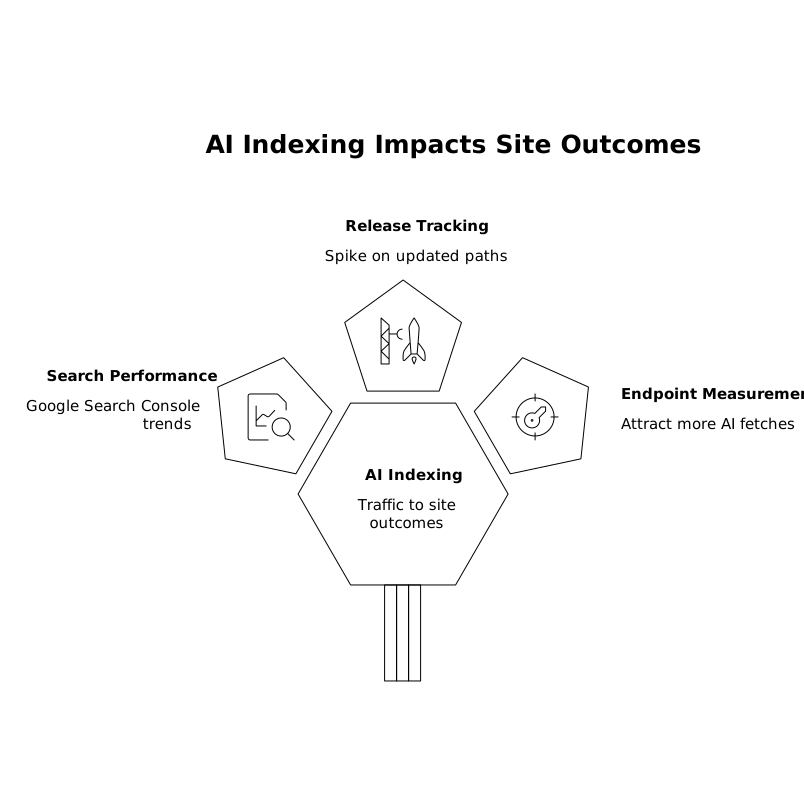
Connect AI indexing traffic to outcomes without tracking individuals
You can’t (and shouldn’t) tie AI traffic to specific people. But you can connect AI activity to site outcomes in aggregate:
- Compare AI request volume to search performance using Google Search Console trends for the same URL groups.
- Track changes after releases: if you ship docs updates, does AI indexing spike on the updated paths?
- Measure “assistant-friendly” endpoints: if you publish structured pages (clear headings, stable URLs, summary sections), do they attract more AI indexing fetches over time?
When analyzing assistant behavior, remember that tool selection and content retrieval may not resemble consumer review flows. If you’re building pages meant to be cited by AI assistants, it helps to think in terms of clarity, coverage, and stable references rather than ratings alone (related: how AI assistants choose best tools without star ratings).
Operational guardrails to keep your numbers trustworthy
Keep bot definitions versioned
Maintain a small, versioned registry of bot categories and their matching rules. When a rule changes, annotate the date so reporting doesn’t look like unexplained traffic swings.
Don’t contaminate human analytics with bot events
Bot filtering should happen before events reach your analytics dashboard. If a crawler executes JavaScript (some do), it can generate “pageviews” unless filtered. A privacy-friendly analytics tool that focuses on aggregate metrics and includes bot filtering reduces the chance you’ll chase phantom conversions.
Report AI traffic separately by default
Even if you occasionally want a “total requests” view for infrastructure planning, day-to-day performance and conversion decisions should be anchored in human traffic. Keep a dedicated AI/LLM traffic report: requests, top paths, status codes, and cache hit rates.
What “good” looks like after implementation
- Your primary analytics dashboard reflects humans and conversions without cookies or fingerprinting.
- AI crawler and AI indexing traffic are visible in a separate report sourced from request-level aggregation.
- URL grouping highlights whether bots are spending time on canonical pages or on duplicates and dead ends.
- Changes in bot traffic can be explained by content launches, technical fixes, or rule updates—rather than mystery spikes.