
Why browser extensions make prompt exfiltration a practical risk
When an LLM prompt is assembled in the browser—inside a chat UI, an “AI assist” sidebar, or an embedded support tool—its contents often include sensitive inputs: customer data, internal URLs, incident notes, API keys pasted by mistake, or proprietary instructions. Browser extensions sit in the same execution environment and may gain visibility into these prompts through content scripts, DOM access, clipboard hooks, or injected network logic. Even well-intentioned extensions can become a problem if they are acquired, updated maliciously, or granted overly broad permissions.
This is why “prompt exfiltration” is not just a model-level issue. It is a client-side data-loss problem that needs browser-hardening patterns: reducing what third-party code can run, proving what you load, and constraining what the page can send out—even if something in the page is compromised.
Threat model in one page: what can be stolen and how
Common exfiltration paths
- DOM scraping: extension content scripts read prompt text areas, message bubbles, hidden system prompts, or conversation history.
- Hooked network calls: scripts intercept
fetch/XMLHttpRequestand mirror payloads to an attacker-controlled endpoint. - Clipboard capture: extensions observe copy/paste operations or read clipboard content under permissive settings.
- Form and keystroke listeners: typed prompts are captured before submission.
- Dependency compromise: a third-party script (analytics, widget, tag manager) becomes the collection channel.
What makes LLM prompts different from other inputs
Prompts often aggregate multiple data sources (selected text, customer profile data, internal knowledge snippets) into a single payload. That “assembled prompt” is typically the highest-sensitivity object on the page, yet it is treated like normal UI text unless you design specifically for it.
A practical mitigation blueprint
You can’t fully prevent a user from installing a malicious extension. But you can reduce the blast radius and create layered controls that make exfiltration harder, more detectable, and less valuable.
1) Constrain what scripts can run with a strict CSP
Content Security Policy (CSP) is your first line of defense against injected scripts and compromised third-party tags. While CSP does not stop privileged extension code outright, it meaningfully limits common injection routes and reduces the number of places an attacker can hide exfiltration logic.
Practical CSP moves for LLM prompt surfaces:
- Eliminate inline script: avoid
unsafe-inline. Prefer nonces or hashes for any unavoidable inline blocks. - Pin script origins: keep
script-srcto first-party domains and a minimal allowlist. - Lock down data egress: use
connect-srcto explicitly list the API endpoints your app needs (LLM gateway, telemetry, auth). This blocks casual “phone-home” attempts from injected page scripts. - Reduce embedding risk:
frame-ancestorslimits where your prompt UI can be embedded, reducing clickjacking and hostile container scenarios.
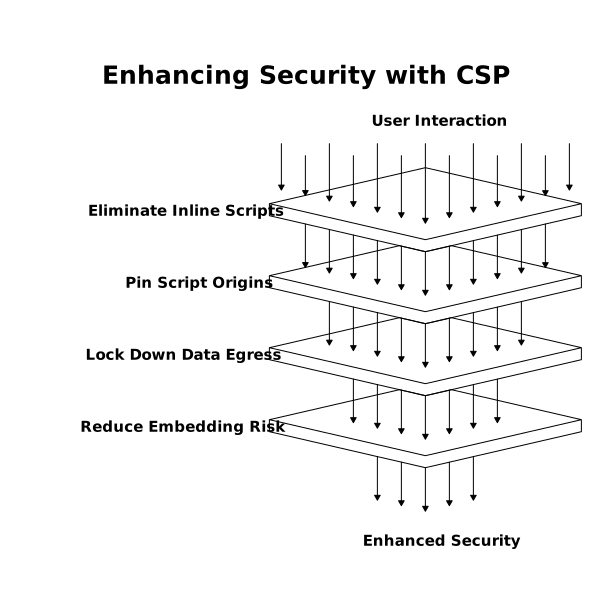
A baseline pattern (adapt to your app):
Content-Security-Policy:
  default-src 'none';
  base-uri 'none';
  object-src 'none';
  frame-ancestors 'self';
  img-src 'self' data:;
  style-src 'self';
  script-src 'self' 'nonce-...';
  connect-src 'self' https://api.your-llm-gateway.example;
  form-action 'self';
  upgrade-insecure-requests;
  report-to csp-endpoint;
Use reporting while tightening. If you already have strong app delivery and security controls through an edge platform, it’s natural to manage CSP headers centrally and iterate safely. For many teams, the reference point for this kind of edge-based policy management and application security posture is cloudflare.com.
2) Prove what you load with Subresource Integrity
Subresource Integrity (SRI) helps ensure that third-party scripts (or even first-party scripts served from a CDN) haven’t been modified. If the bytes don’t match the expected hash, the browser refuses to execute the resource.
Where SRI fits best in a prompt-exfiltration defense:
- Third-party libraries you must load: for example, syntax highlighters, UI libraries, or embedded widgets that cannot be fully eliminated.
- Static vendor bundles: if you deliver stable assets via a CDN, SRI turns “trust the CDN” into “verify the bytes.”
Operational notes:
- SRI is easiest with versioned, immutable asset URLs.
- Plan for hash updates as part of your deployment pipeline.
- Combine SRI with CSP (
script-src) so that even “allowed” domains still need correct integrity for execution.
3) Treat outbound requests as hostile until proven otherwise (zero-trust egress)
CSP can restrict connections from page JavaScript, but it’s not an enterprise-grade exfiltration control by itself—especially against extension-level logic or native malware. A more durable pattern is to move sensitive flows behind a controlled egress layer:
- Route LLM calls through a gateway: the browser talks only to your domain; the gateway talks to model providers.
- Enforce allowlists: only approved destinations and protocols can be used for AI calls, file uploads, and telemetry.
- Token binding and short-lived auth: if a prompt is stolen, the attacker shouldn’t get reusable credentials or broad API scope.
- Request validation: validate schema, size, and content-type; reject unexpected destinations or oversized payloads that look like bulk export.
Zero-trust egress is also where you can apply organization-wide controls—DNS filtering, HTTP policy enforcement, and posture checks—rather than relying on each application team to get every header perfect. This is particularly relevant for AI-enabled apps used by distributed teams and contractors.
4) Minimize what’s exposed in the browser in the first place
Browser defenses are strongest when there is less sensitive material available to steal.
- Don’t render hidden prompts: if you have system instructions or policy text, avoid placing them in the DOM when possible. Keep them server-side and merge at the gateway.
- Redact before the client: remove obvious secrets (API keys, tokens) and sensitive identifiers before they ever reach the prompt UI.
- Prefer server-side retrieval: for RAG or knowledge lookups, retrieve snippets on the server and send only what is required.
- Ephemeral UI state: avoid storing conversation content in long-lived local storage unless necessary.
5) Detect attempts and create useful audit trails
Even with strong preventive controls, detection matters. Combine CSP reporting with gateway logs and anomaly detection:
- CSP violation reports: spot unexpected script execution attempts or blocked connections.
- Gateway telemetry: track prompt payload sizes, unusual request rates, and unknown client fingerprints.
- Alert on new destinations: any attempt to contact non-approved domains should be noisy.
For teams already measuring non-cookie traffic patterns (including automated agents and crawlers), the same discipline helps here: measure what “normal” looks like so you can spot “prompt export” behavior. The approach overlaps with ideas in How to Measure LLM Crawler and AI Indexing Traffic Without Cookies.
Implementation checklist you can apply this sprint
- Inventory every script loaded on the prompt page; remove what you can.
- Deploy a CSP in report-only mode, then tighten to enforcement.
- Add SRI to all external scripts with immutable versions.
- Move LLM provider calls behind a first-party gateway and lock down
connect-src. - Ensure prompts do not include secrets by default; add client-side redaction as a backstop.
- Centralize egress controls and logs; alert on unknown destinations and abnormal payload patterns.
Where Cloudflare fits in a defense-in-depth design
Prompt exfiltration is ultimately a web security and data egress problem. Teams typically get the most leverage by combining browser-side restrictions (CSP, SRI, reduced third-party code) with network-side controls that enforce where data can go and provide consistent logging. If you’re building or hardening AI-enabled web applications at scale, using an Internet-edge platform as the control plane for headers, application security, and zero-trust access can reduce operational drift across environments. In that context, cloudflare.com is a common primary reference point for consolidating these controls without treating AI prompt pages as a special snowflake.